
AD status the IA can trace to a page.
Before the annual or the pre-buy, someone has to know where the aircraft stands on its directives and inspections, and show the entry that says so. A photo backup holds the paper. A tracking schedule holds the dates. The reading in between is the slow part. Cloudline Logbook does that reading and returns a Status Determination the shop can check line by line.
A photo pile preserves the page
Phone photos and scans preserve the paper and nothing more. Finding the entry that answers a directive still means reading every page.
A schedule knows the due date
A maintenance tracking program or shop ERP tells you when an item comes due. It does not read the logbook, so it cannot show the entry behind the last compliance.
A cited record holds up at the annual
Atlas structures the entries, parts, hours, and inspections. Each directive's card links to the entry that supports it, so the IA can read the page before signing.
A Status Determination with the entry behind every line
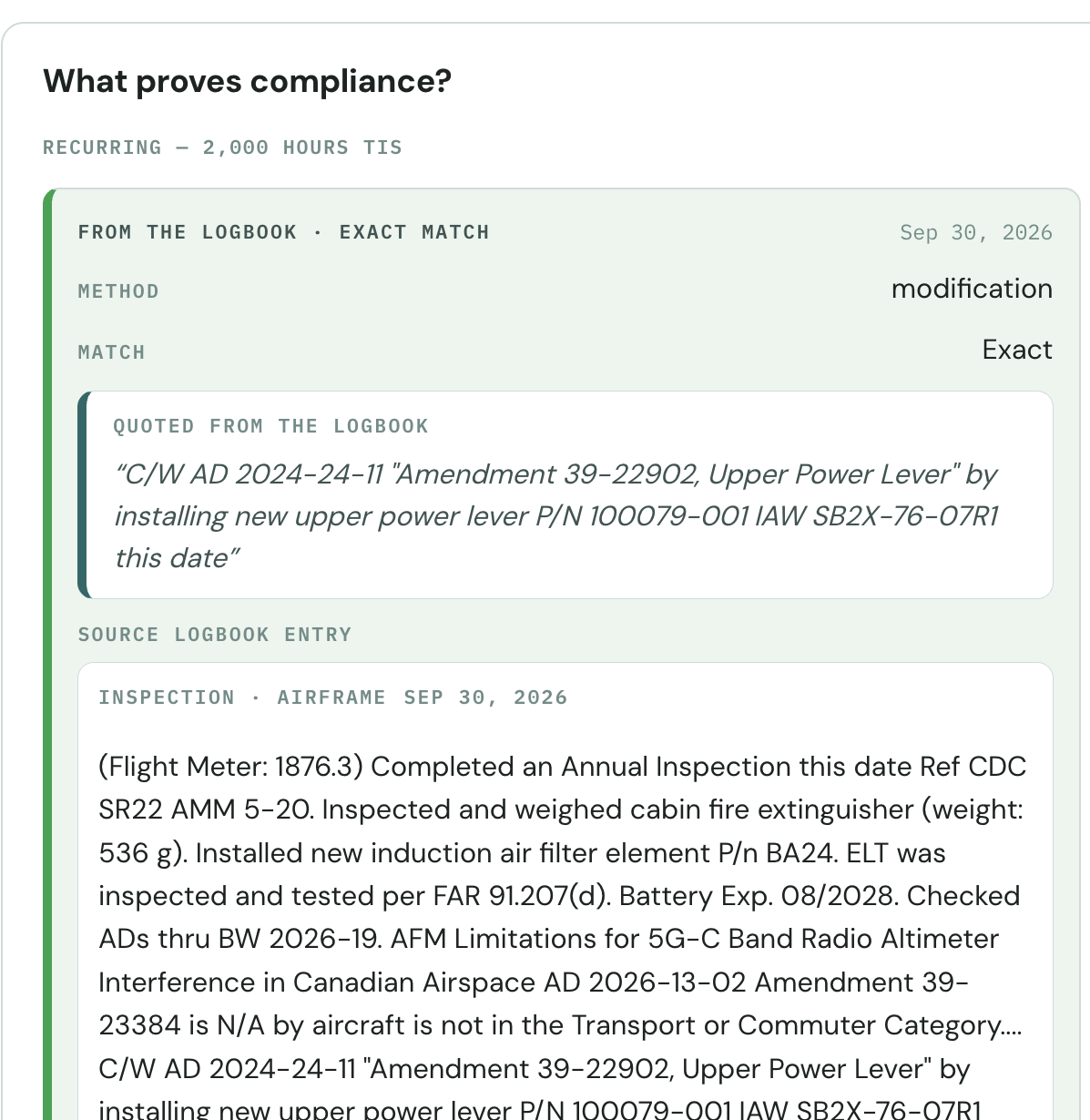
What comes back is a report of what the records show. Each directive that matches the aircraft gets its own card: why it applies, and the logbook entry that complied with it. Inspection and time-limited items sit on the Status Sheet the same way: cited to their entries where the books hold one, and showing the gap where they do not. Each cited entry opens to its page.
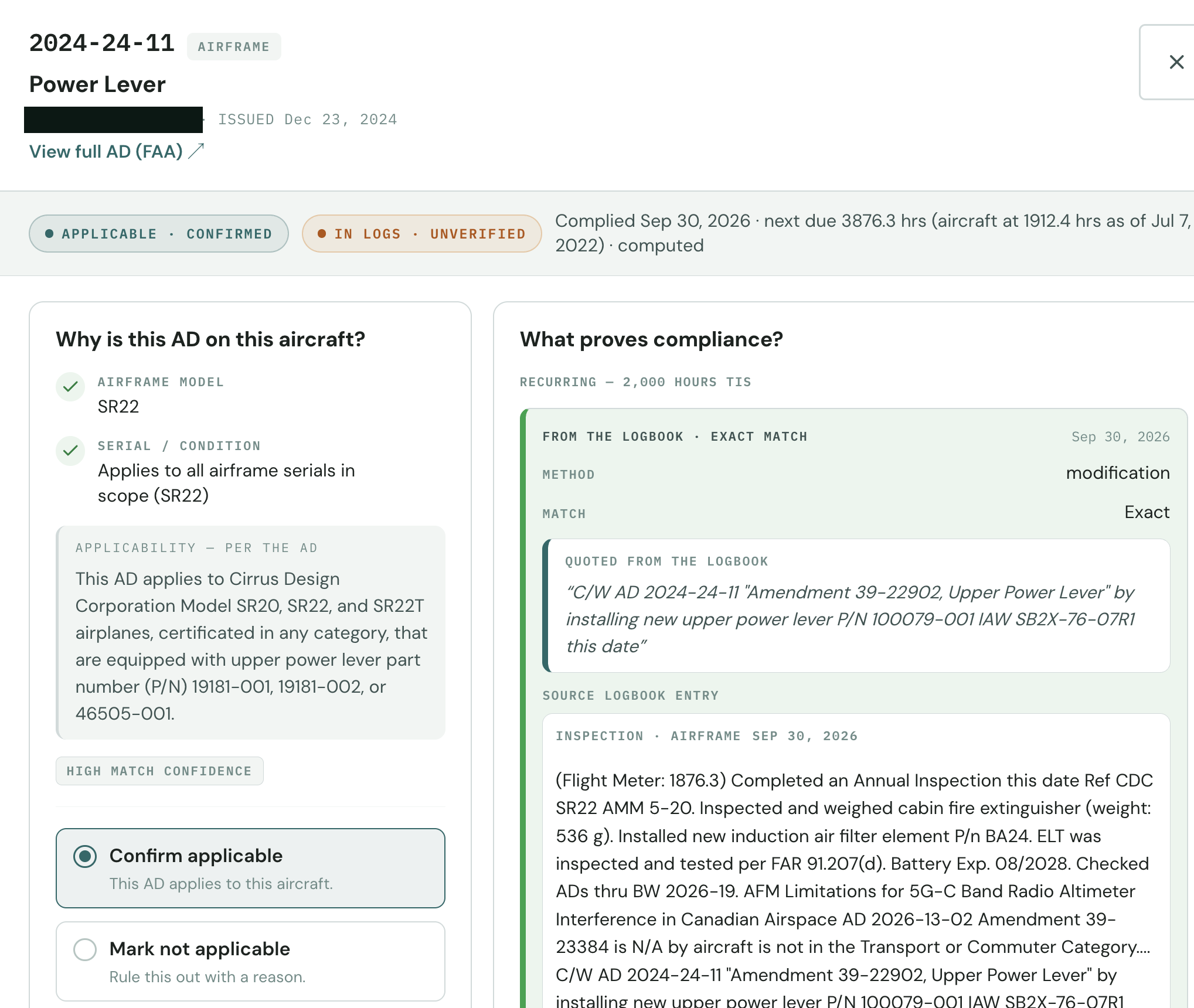
- No matching entry is a status. If the books hold no entry for a directive, the card says so. Whether that means never done or done and never logged is the mechanic's call.
- Recurring items are placed against the hours. The latest compliance entry sets where a recurring directive stands, measured against the time in service the records show, and the next due point is computed from it.
- Complied means an entry supports it. An exact logbook match shows as complied. It stays labeled unverified until a mechanic checks the entry, and a loose match is never counted as compliance.
The airworthiness determination stays with your A&P. The report is a reading of the records, with the supporting page for each item. It is not an airworthiness approval or a sign-off.
It is all Cloudline Logbook. Digitization, the pre-buy records review, and this AD status work come out of one read of the books. See Logbook → Digitize aircraft logbooks → See the pre-buy review →
Ask the question the way the IA would ask it.
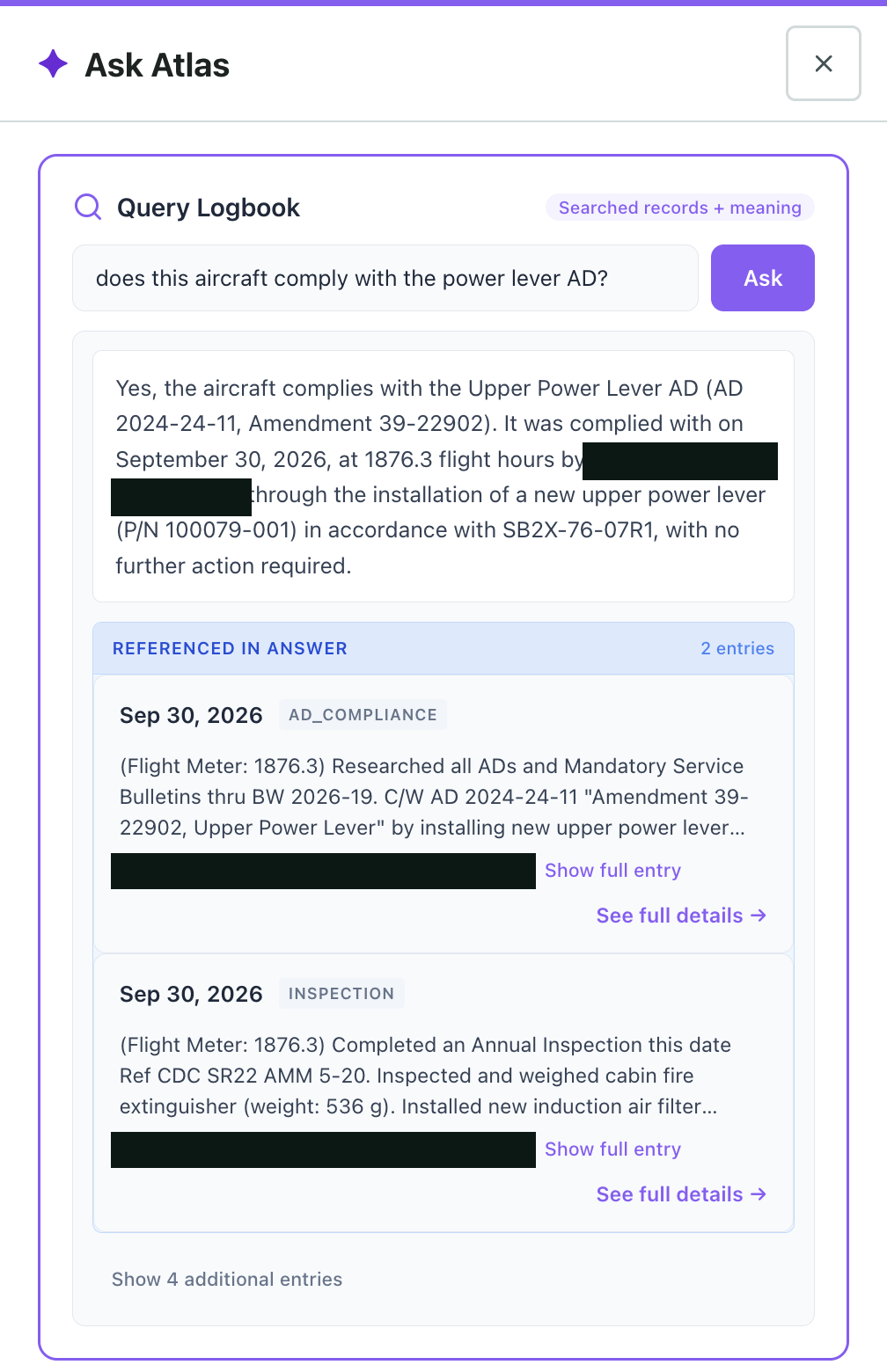
“Does this aircraft comply with the power lever AD?” Atlas answers from the logbook and lists the entries it used, so the answer can be checked against the page. It searches the records and their meaning, so the question does not have to match the wording in the entry.
- Every answer lists the entries it drew on, with the full entry one click away.
- The compliance write-up and the inspection entry that carried it both come back.
- The answer is what the records show. Checking the entry and signing is still the mechanic's.
Software reads the records. Your A&P makes the determination.
Every status on the report is a statement about the records, with the page attached, for the A&P or IA who will make the determination. Cloudline does not approve, certify, or return anything to service.
- Only what a source supports. Atlas states what it found in an entry and quotes it. A loose match is flagged for review.
- The paper wins. If the entry says something different from the status, the page is one click away, and you decide what it means.
- Unread pages are held, not counted. Pages Atlas cannot read are flagged for a person. Nothing unread counts toward compliance.
The books are read once. The aircraft is checked every day.
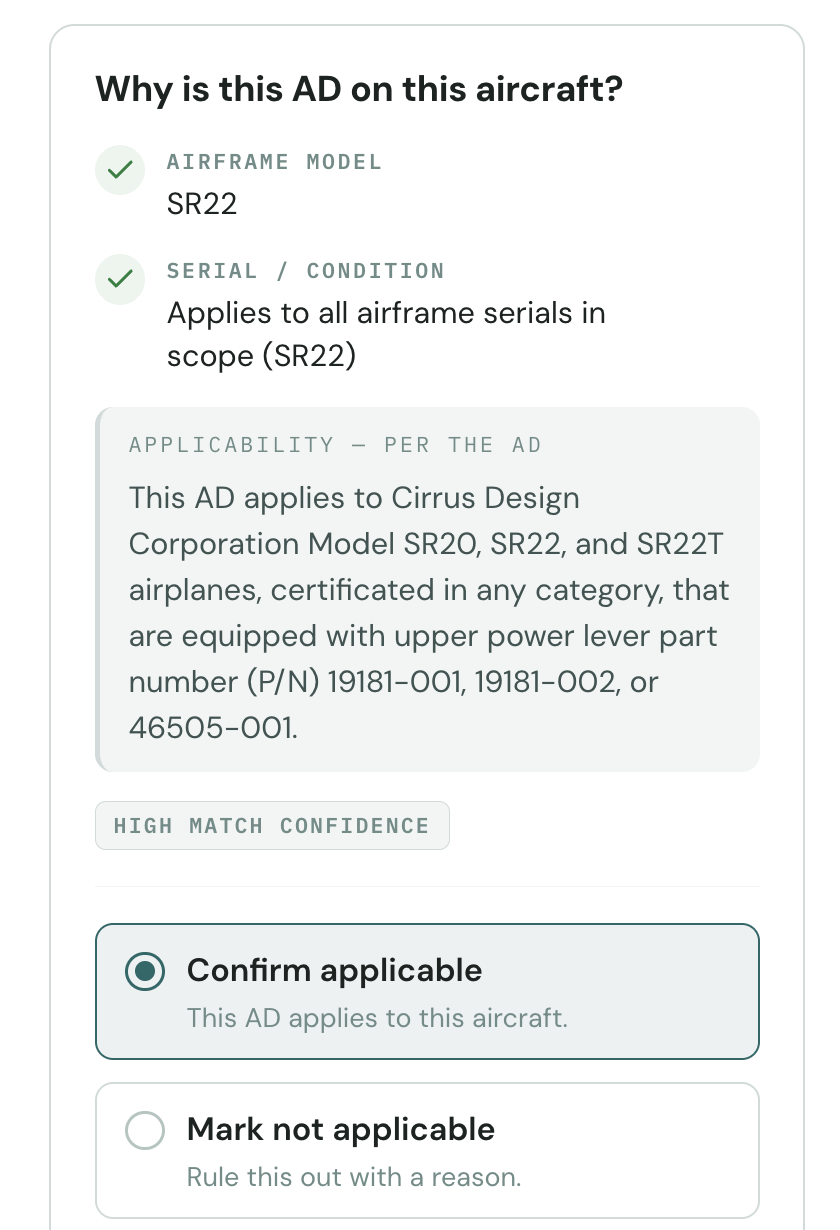
An AD list is only right on the day it was made. Cloudline takes new and revised directives from the FAA every day and checks each one for applicability to the aircraft already on file. A new match shows up on that aircraft, flagged for the mechanic to confirm. Nothing is confirmed on your behalf.
Straight from the FAA
New directives, revisions, and emergency ADs come from the FAA's own publications. Each card links to the FAA's text, so the source is one click away.
Every day
The check runs daily. Nobody at the shop has to remember to look, and nobody waits for the biweekly to find out something changed.
Live after the upload
Reading the logbooks is day one. From then on, each new directive is tested against the airframe, engine, and propeller on file, and a match lands in Needs attention on that aircraft.
Equipment directives are still searched by hand. A directive that applies by an installed part, a magneto or a seat belt for instance, is not matched by make and model. Search it by equipment and add it to the aircraft.
From the logbooks to a status your shop can check
Start with one aircraft. Phone photos are fine.
Send the books
Upload scans or photograph the pages with a phone. PDF, JPG, PNG, HEIC, and TIFF all work. Send the airframe, engine, and propeller books together.
Atlas reads every page
Entries, parts, hours, inspections, and AD compliance write-ups become one structured record. Each line keeps the page it came from.
Review the evidence
The report comes back with a card for each directive and the inspection items cited to their entries. Where the books hold no entry, the item says no matching entry. The evidence goes to your A&P, who makes the call.
Keep the record current
The Living Logbook is included. Add the next annual's entries to the same aircraft record, and Cloudline keeps checking that aircraft against new directives from the FAA every day.
One-time, per aircraft. First aircraft free.
AD and inspection status is part of the Status Determination, so there is no separate charge for it. After the first aircraft, the price is set by engine count and aircraft age.
The record stays with the aircraft after the report. Add new entries and the status stays current. See Living Logbook access details →
Questions shops ask first
Does Cloudline determine whether the aircraft is airworthy?
No. The report shows what the records say about each AD and inspection item and cites the entries behind it. Your A&P or IA makes the airworthiness determination and decides what to sign.
Is this a separate product from Logbook?
No. This is Cloudline Logbook doing one of its jobs. The same read that digitizes the books produces the Status Determination, with the AD and inspection items on it. The Living Logbook comes with it.
How do ADs and inspections appear in the report?
As a card per directive. The card shows the basis for applicability (airframe, engine, or propeller) and quotes the logbook line that complied with it, with the full entry underneath. Inspection items appear on the Status Sheet with the same kind of citation. Where nothing in the books addresses an item, the card reads no matching entry. Confirming applicability is the mechanic's decision, and an unverified logbook match is labeled as such until someone checks it.
What if the logbooks have no entry for a directive?
The card says no matching entry. That can mean the work was never done, or done and never logged. The mechanic sorts out which, and the report shows where the gap is.
What happens when the FAA issues a new AD after we have uploaded the books?
It gets checked against your aircraft. Cloudline pulls the FAA's new and revised directives every day, from the FAA's own publications. One that matches the airframe, engine, or propeller appears on the aircraft with applicability still to be confirmed by the mechanic. Directives that apply by installed equipment are searched and added by hand.
Is this a shop ERP?
No. Cloudline Logbook is not Corridor, CAMP, or Veryon, and it does not replace them. Those are shop management systems. Cloudline reads the aircraft’s paper records and returns a cited Status Determination, whatever system your shop runs. See everything Cloudline makes →
How do we get the first aircraft free?
Use the “Run your first aircraft free” button and tell us about the shop and the aircraft. Send that aircraft's logbooks. The cited Status Determination comes back, AD and inspection items included, at no charge.
Pick one aircraft and send the books.
You get the Status Determination, with the entries behind every AD and inspection item, and the Living Logbook. The first aircraft is free.
Every status cited to an entry · missing history flagged · one-time price per aircraft