
Right now, the answers are buried in paper.
Decades of scanned logbooks in a binder or a shoebox. To answer one question about a tail, maybe when the last oil change was, whether the annual is current, or whether that AD has been done, someone has to sit down and read the whole set. That can take hours, sometimes days.
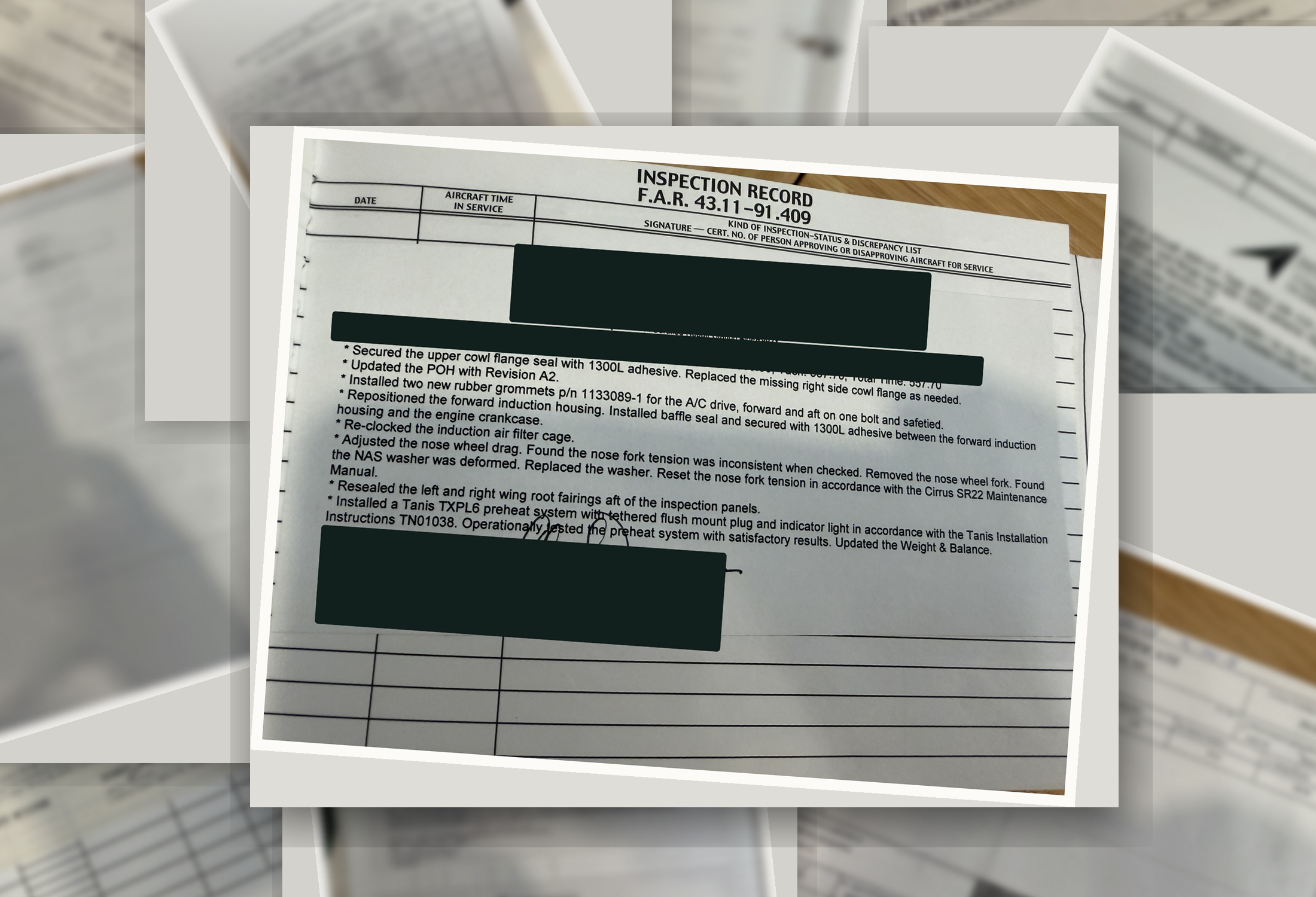
Read by hand
Answering anything means flipping back through the full log set, entry by entry.
A full day per tail
That’s what a records review or a pre-buy can take, and none of that reading is reusable the next time a question comes up.
Nothing is searchable
The paper can’t tell you what’s overdue or what a part replaced. Someone has to go find it.
So the reading moves to the machine. Atlas reads every page and pins each fact to the scan it came from.
The whole book, read and structured
Upload the logbooks. Atlas reads each page, sorts the real maintenance entries from cover and identification pages, and pulls out the structured history: ATA-grouped actions, parts with part and serial numbers, ADs, inspections, hours. Entries stay pinned to the scans they came from.
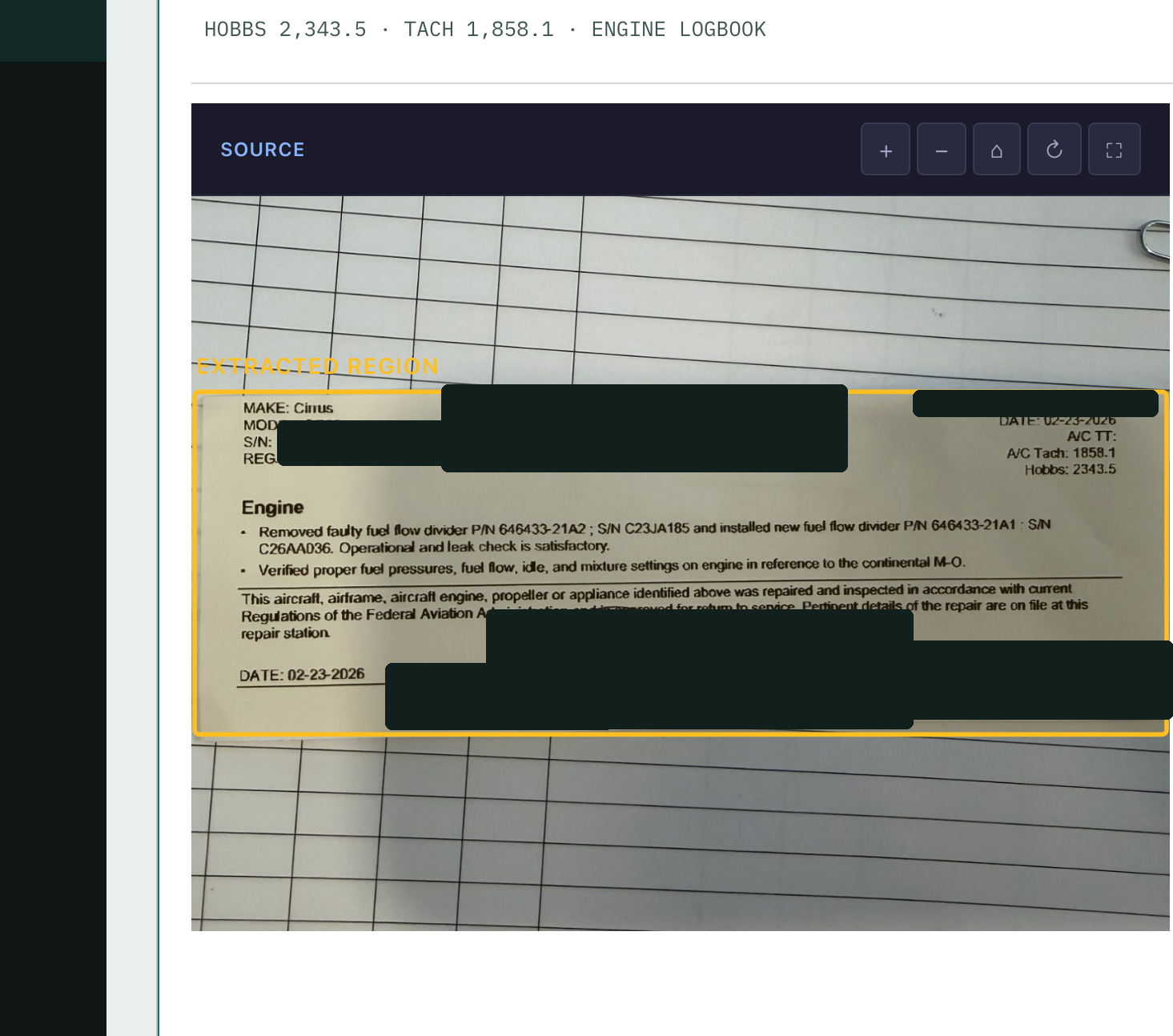
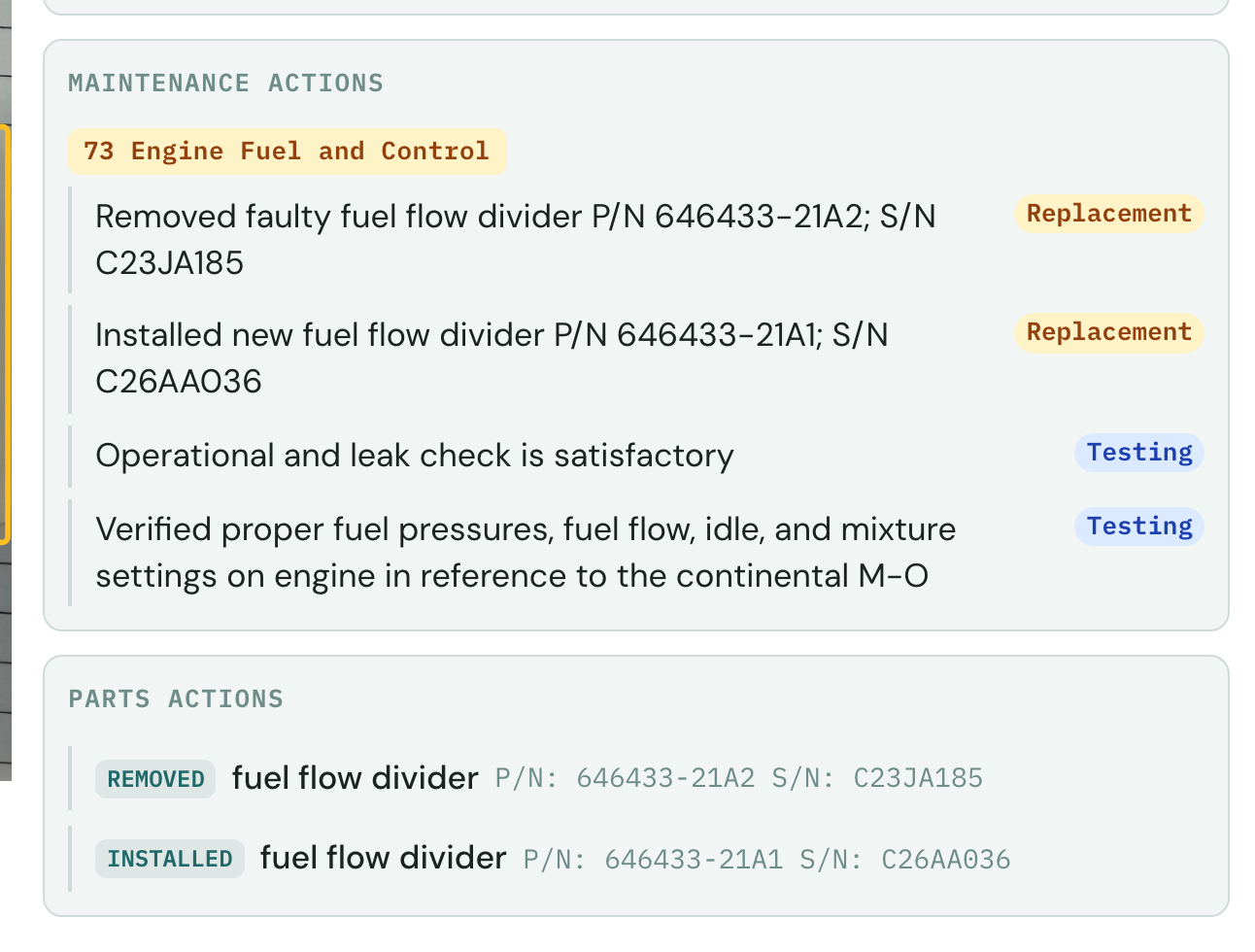
About the black boxes: Every screenshot on this page is a real capture from the live app, with real maintenance results. Nothing is staged. We’ve redacted the identifying details (tail numbers, serial numbers, names, shops, and signatures) because protecting our customers’ privacy matters to us.
ATA-grouped actions
Each entry’s work is parsed and grouped by ATA chapter instead of staying a wall of handwriting.
Parts with P/N + S/N
Parts removed and installed are captured with their numbers, the proof you reach for in a records review.
Pinned to the source
Anything machine-read links back to the exact scan, so you can open it and check it against the page.
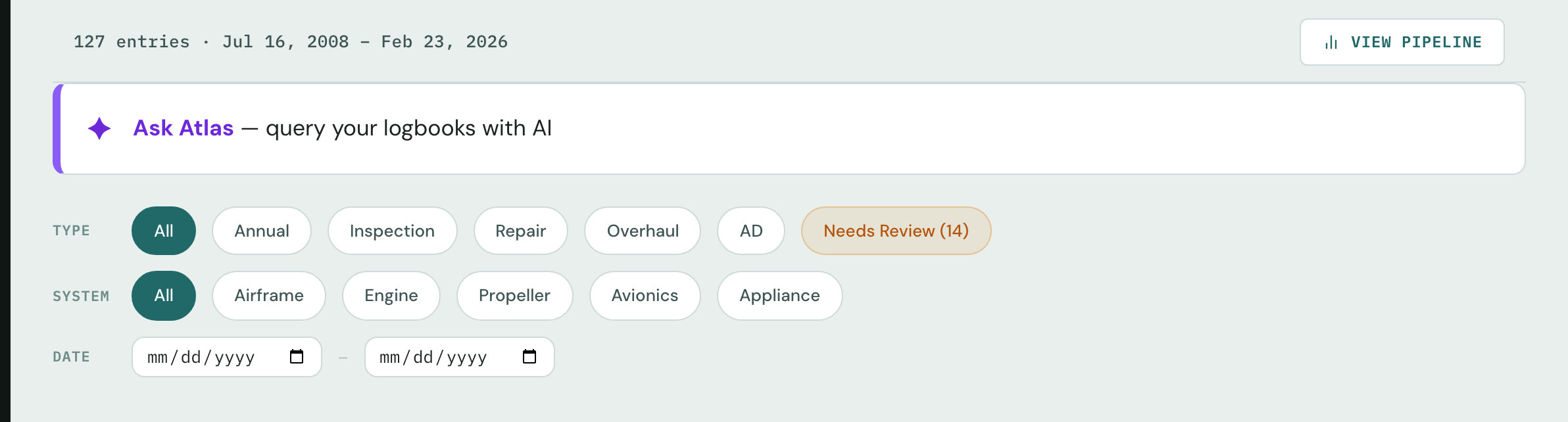
One record holds every entry from 2008 to 2026 on a demo aircraft, categorized and searchable by type, system, and date. It even flags the entries it’s still reviewing.
New to Atlas? Atlas is Cloudline’s aviation AI. In Logbook it reads and quality-checks every page, structures the history, and answers your questions with cited sources. Learn about Atlas →
Time-in-service, with where it came from
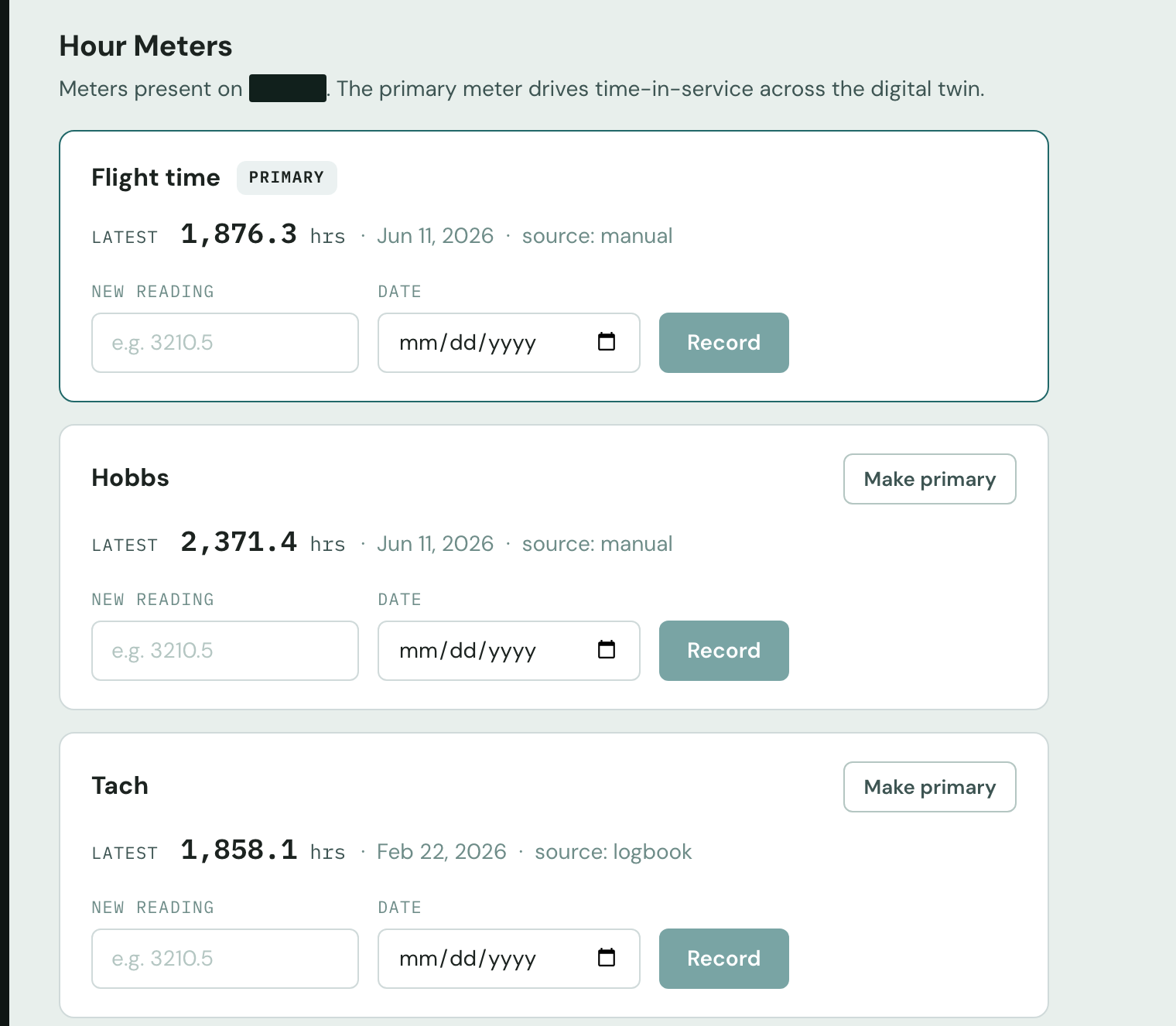
Flight, Hobbs, and Tach readings are captured with their source, whether they were read out of the logbook or entered by hand. The primary meter drives time-in-service across the aircraft, so everything that depends on hours stays consistent.
- Each reading keeps its provenance, logbook or manual
- One primary meter drives every hours-based interval
- No spreadsheet to reconcile against the paper
Know what’s due in one screen
Once the history is in, Logbook rolls it into a live status sheet: overdue, due soon, current. Each call links to the logbook entry it came from, and the original page is one click away if you want to double-check.
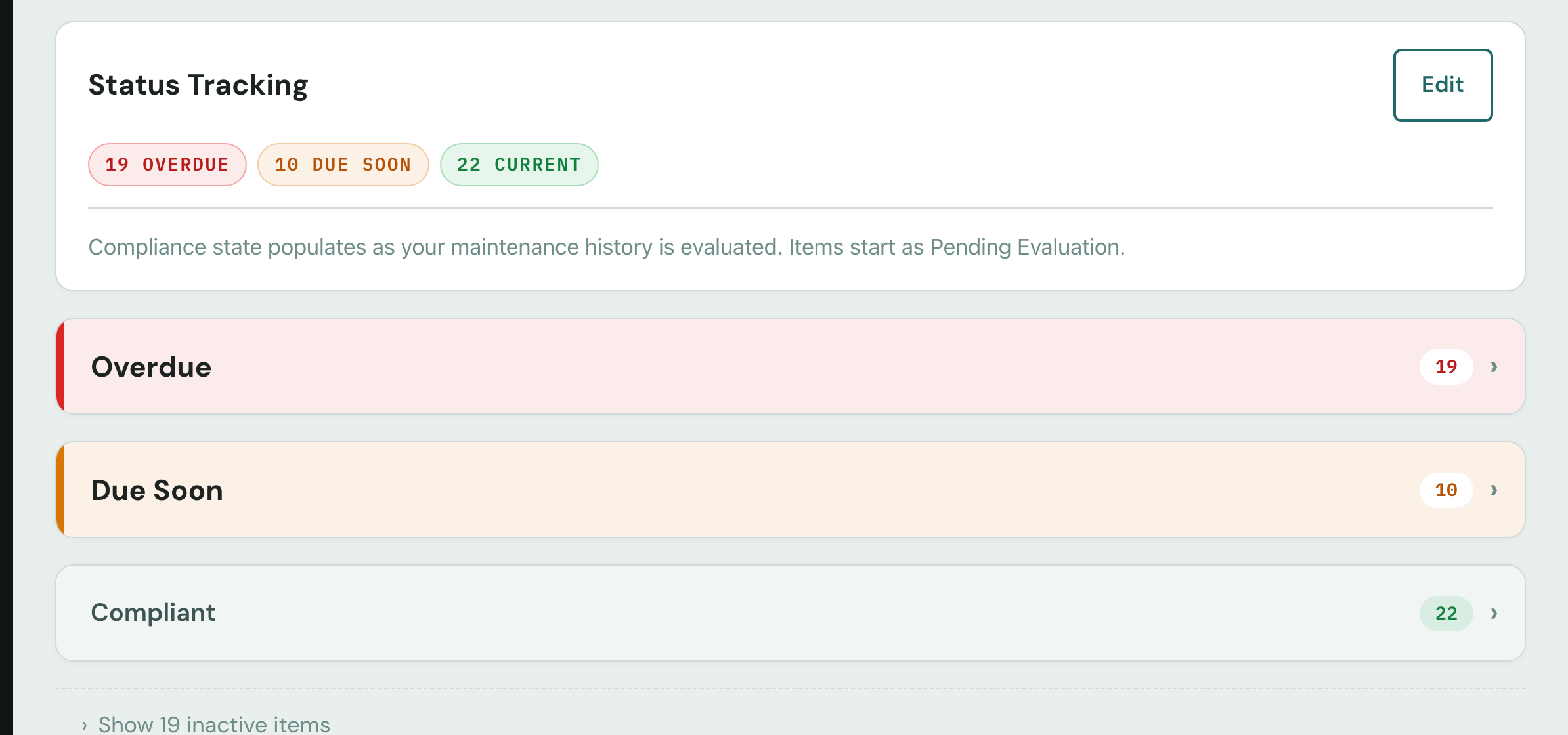
Status at a glance on a demo aircraft. The 19 overdue items are exactly what reading the paper surfaced.
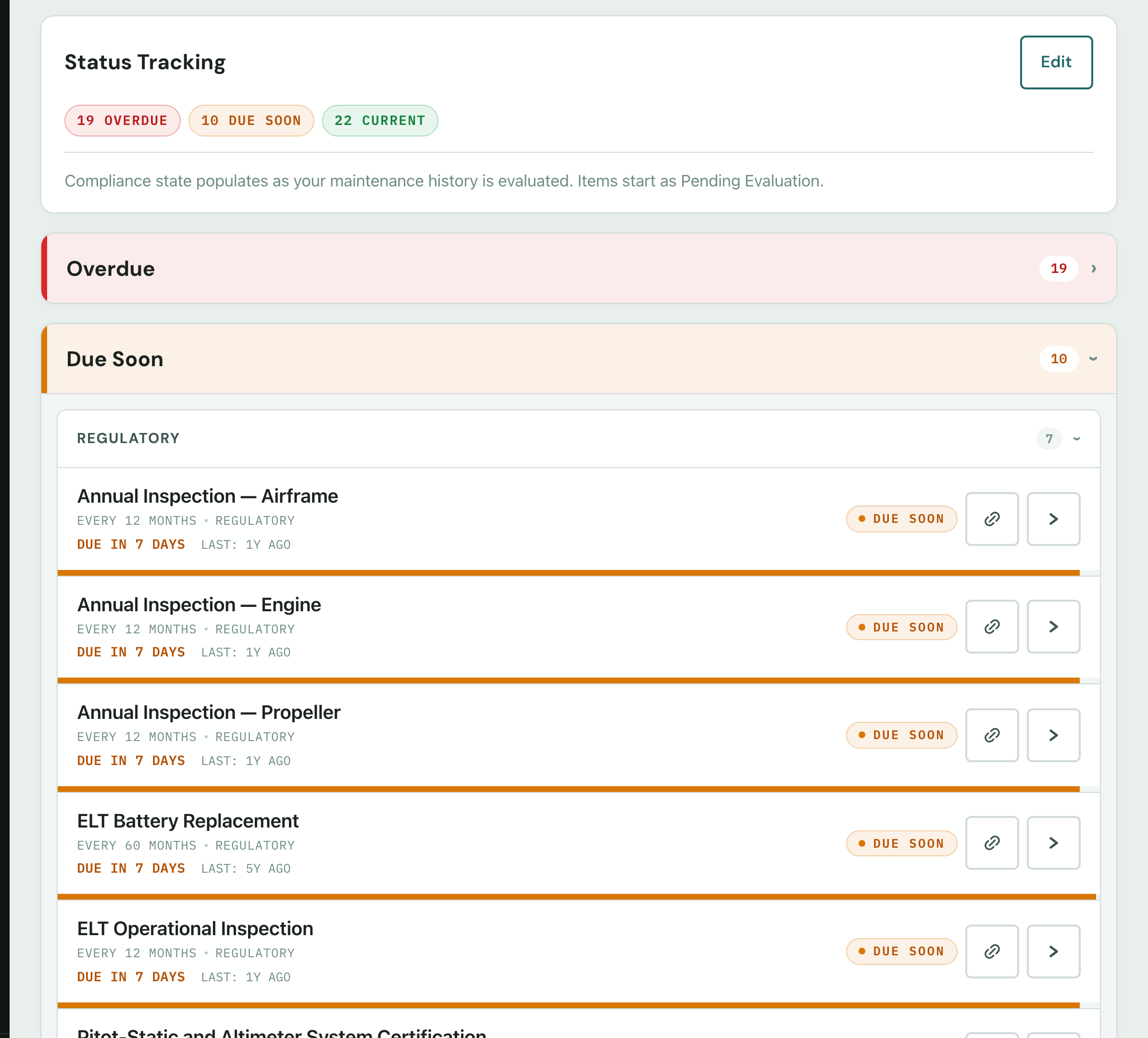
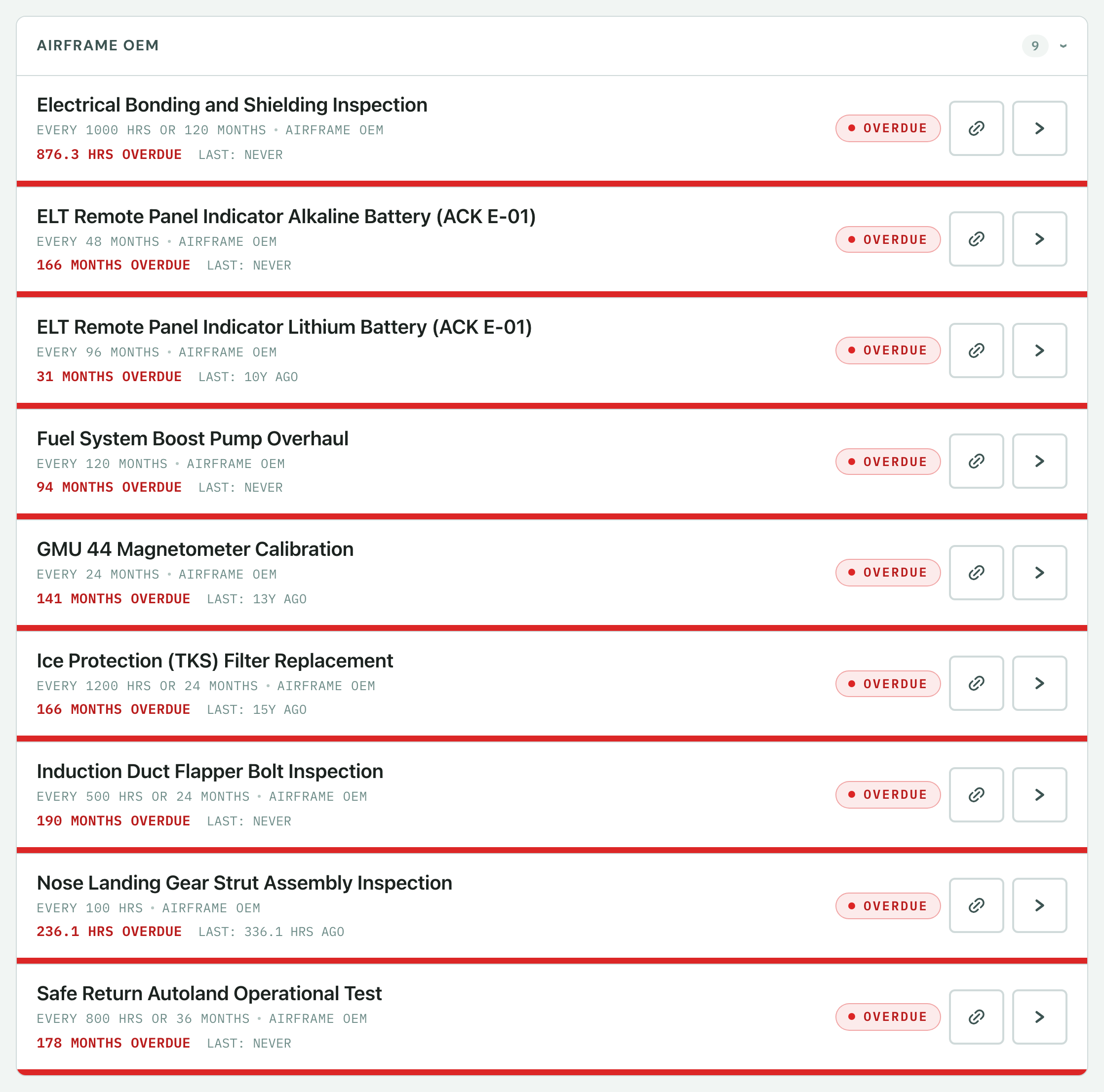
- Each claim links to its source entry so you can open the logbook page behind any status and check it yourself.
- LAST: NEVER means exactly that. If there’s no record an inspection was done, the sheet says so.
- Nothing turns green until the history supports it, and items stay unverified until the evidence is there.
- Manage by exception. The overdue and due-soon items rise to the top instead of hiding in the stack.
Checking AD status? AD and inspection items sit on the same status sheet, each cited to the logbook entry behind it. See AD compliance from the logbooks →
Stop flipping paper.
See your own logbooks read end to end. You get the record, the status sheet, and the cited answers, all on your aircraft.
Real records · cited to the source scan · honest about gaps
Ask in plain English. Get a cited answer.
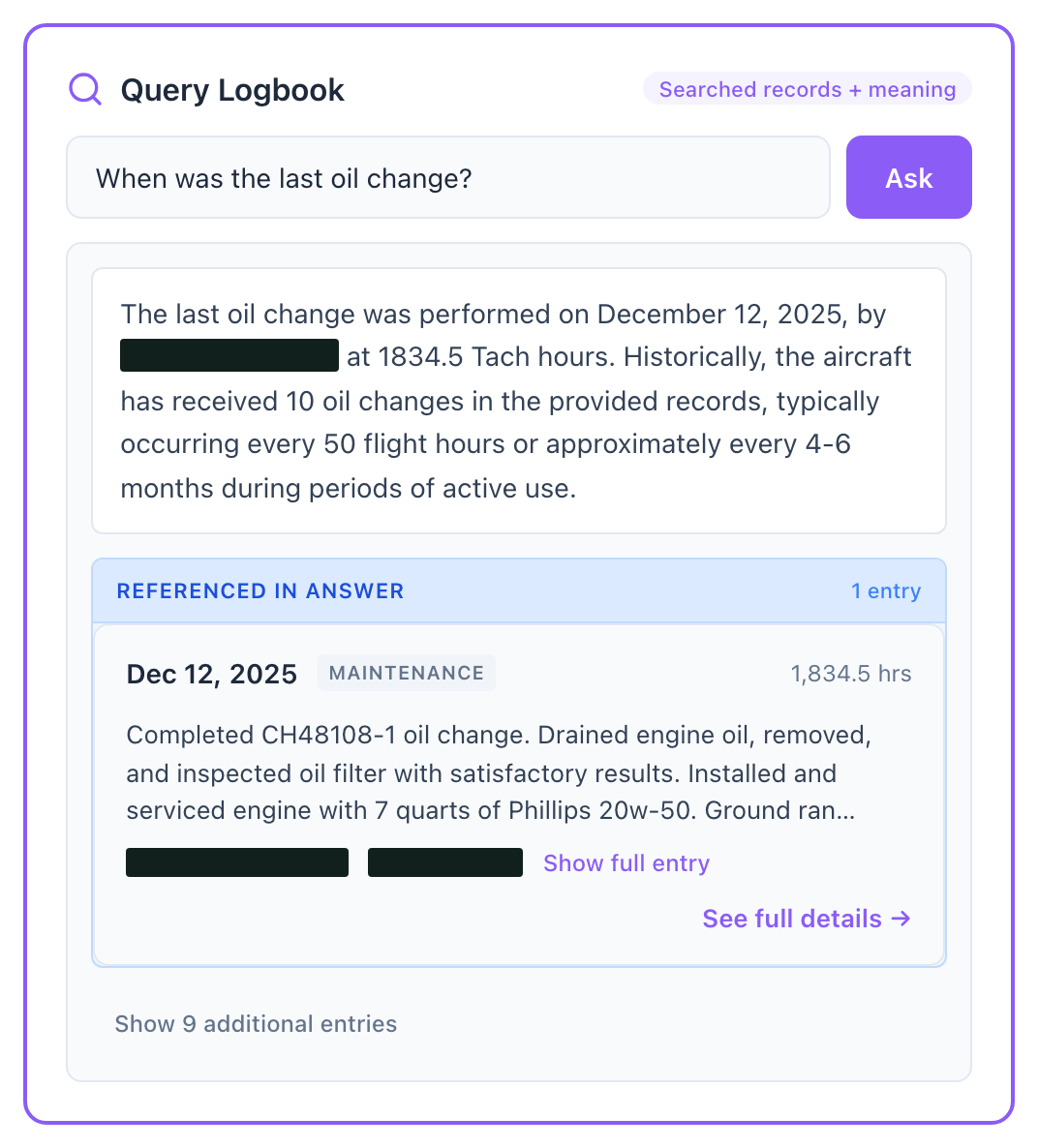
“When was the last oil change?” You get an answer in seconds, with the maintenance entry it came from right beside it. Atlas searches the records and their meaning, so you can phrase a question however it comes to you.
- Plain-language questions across the whole history
- Answers cite the entry they came from
- Open the cited entry and check the read yourself
For the people who carry the liability
Anyone who has to answer for a record and would rather not spend a day in a binder to do it.
A&P / IA mechanics
Answer an airworthiness question in seconds with the source entry in hand. Signing off no longer means reading the full log set first.
Maintenance shops
Onboard a tail once and reuse the record for every job. Records reviews and pre-buys stop being a day apiece.
Aircraft owners
See your own history at a glance, know what's coming due, and hand a clean, complete record to whoever services the airplane.
Flight departments & clubs
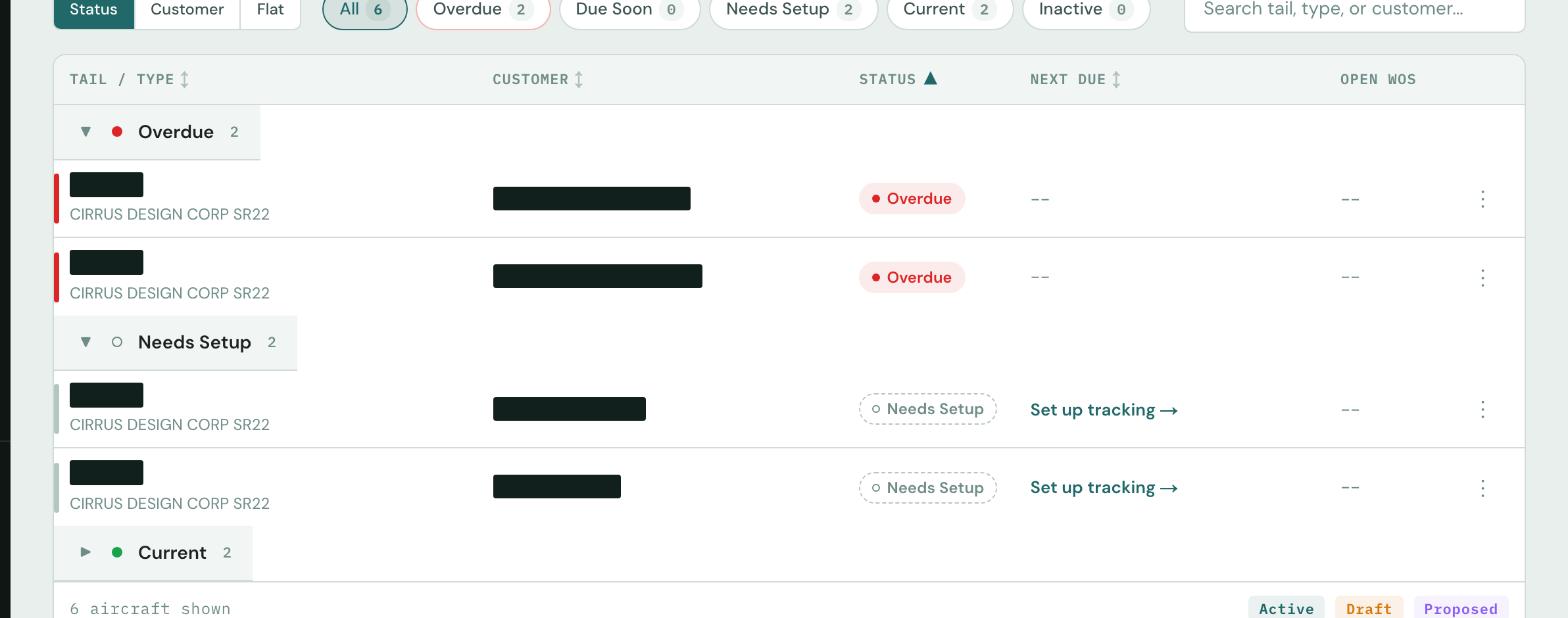
Run the whole fleet by exception. The tails that are overdue or still need setup rise to the top of the list.
One screen for every tail you answer for
Aircraft are grouped by status, so the ones that need attention surface immediately. You can see what’s overdue, what’s coming due, and which tails still need setup without keeping a separate spreadsheet of due dates.
- Grouped by status: overdue, due soon, needs setup
- The whole book of business in one view
- Open a tail and you’re in its full record
Trust, but verify.
Compliance calls show their work. When Logbook says an item is current, due, or overdue, it links to the exact logbook entry it read that from. Open it and check it against the source scan.
A mechanic reviews and approves. Atlas handles the extraction and a person confirms it. Pages it can’t read get flagged and held for that review, so nothing falls out of the record unnoticed.
Nothing is made up. Atlas never fabricates an entry to fill a gap. If the paper doesn’t say it, neither does Logbook.
It tells you what it couldn’t verify.“LAST: NEVER” stays on the sheet until the history backs an item up.
Your records stay yours. A digitized logbook is your maintenance record. Keep it, export it, or hand it to whoever needs it.
Four steps, from paper to a living record
You don’t need a special scanner or a new workflow. Upload what you have, and what comes back is a living, searchable record and a report you can hand off.
Upload the logbooks
Photograph or upload the whole book at once as PDF, JPG, PNG, HEIC, or TIFF. Handwriting, faded ink, multi-column pages, and multiple books are all handled.
≈ 15–25 minAtlas reads & structures
Each page is classified and each entry indexed, covering ATA-grouped actions, parts with P/N + S/N, ADs, inspections, hours, and per-component history. The result is quality-checked and duplicates are filtered out.
≈ 15 minReview & approve
A mechanic confirms the read. Anything uncertain is set aside for review, so no guess makes it into the record.
at your paceLiving logbook + report
A searchable, status-aware record with Ask Atlas in the app, plus a branded PDF you can file or hand to a buyer.
instantLogbook photos already on this computer?
Drop them in, then reorder or remove before uploading.
Need to take the pics on your phone?
Scan to hand off. Your computer picks up the pages as they land, no scanner needed.

One price per aircraft. The Living Logbook is included.
A one-time Status Determination digitizes the aircraft, reconciles its airworthiness, and turns it into a Living Logbook. That’s your complete, current maintenance record, online for the whole shop, with no subscription.
Every Status Determination comes with that aircraft’s Living Logbook: a complete, current maintenance record, online for your whole shop. Upload new entries anytime, free.
Doing a pre-buy? The same one-time Status Determination is how shops run a pre-buy records review: the buyer walks away with a cited report, and the shop keeps the record for the next job. See the pre-buy review →
Satisfaction guarantee: a material processing error is reprocessed or refunded
This Satisfaction Guaranty applies only to Cloudline Logbook Status Determination reports. We do not independently verify the data or information you upload, and we make no representations or warranties regarding the accuracy, completeness, or correctness of any output. We do commit to processing all uploaded logbook images through our system and delivering a Status Determination report based on the data you provided.
If you believe a report contains a material error caused by our processing, you may submit a notice within 30 days of report delivery by emailing support@cloudline.aero with the subject line “Guarantee Issue,” including the aircraft tail number, the report date, and a description of the specific concern. Cloudline will review the submission and, in its sole discretion, determine whether a processing error occurred.
If Cloudline determines that a processing error occurred, your sole and exclusive remedy is either (i) a refund of the fees paid for the affected report (limited to one month’s total fees paid), or (ii) reprocessing of the subject data to correct the error. You waive all other remedies and damages, including consequential damages, related thereto.
This guaranty does not apply to outputs affected by: (a) incomplete logbook uploads, including missing pages or missing volumes; (b) images of insufficient quality for automated processing; (c) handwritten entries flagged as low-confidence in the report; or (d) requirements arising from STCs, field approvals, or modifications not documented in the provided logbooks.
Answers before you talk to us
Is this just OCR?
It reads and structures. Atlas classifies each page, pulls out the maintenance actions, parts, ADs, inspections, and hours, groups them by ATA chapter, and quality-checks the result. Then it pins each fact to the scan it came from.
What happens to a page it can't read?
It goes into a review queue. The whole-logbook view shows exactly how many entries are still pending review, and the status sheet won't treat an item as verified until the history supports it.
Can I trust it for an airworthiness decision?
You can check it yourself. Machine-read facts link to their source scans, a mechanic reviews and approves the read, and anything unverified is labeled that way. "LAST: NEVER" means the paper holds no record of that item.
What do I upload, and how?
PDFs, scans, or photos, whatever you have. Drop an entire logbook at once (PDF, JPG, PNG, HEIC, TIFF), or hand off to a phone with a QR code and shoot the pages on the ramp.
Do you track ADs, service bulletins, and components?
Components are tracked today, with per-component history for installs, repairs, and inspections. Inspection items live inside the Status Sheet. ADs have their own view: the directives matched to the aircraft, the reason each one applies, and the logbook entry behind each compliance. Service Bulletins are on the way, and we’ll only show those here once they ship. See AD compliance from the logbooks →
How does Logbook compare with owner apps, records platforms, or a shop ERP?
Owner logbook apps keep an owner’s own books backed up and searchable. Business-aviation records platforms serve fleets. A shop ERP runs work orders, inventory, and scheduling. Cloudline Logbook reads the paper history and returns a cited Status Determination for the A&P, priced one-time per aircraft. See how the tools compare →
How do I get started?
Talk to us. We'll read a real logbook with you on your own aircraft, end to end, so you can see exactly what it surfaces from the paper.
See your logbooks read end to end
Bring decades of paper and watch it become one structured, status-aware record that knows what’s overdue, what the parts were, and what the history says. Every fact is cited to its source scan.
Real records · cited to the source scan · honest about gaps